


Why Your Child Can Decode Fine But Still Can't Understand What They Read

Updated: Sep 12
You sit down at the kitchen table, pull up a chair, and watch your child fly through a page of text. They pronounce the multi-syllable words correctly, navigate the punctuation, and close the book with a sigh of relief. But the moment you look at them and gently ask, "What happened in that story?" — the room goes completely quiet.
They look at you blankly. They aren't faking it. They aren't trying to be difficult or lazy. They genuinely, truly do not know.
If you have watched this happen week after week, you have probably felt that tight knot of frustration in your stomach, wondering if you are doing something wrong. You aren't.
I'm a National Board Certified Teacher and Reading Specialist with 25 years in classrooms across multiple states, and I'm a bonus mom to a son with dyslexia. I have ADHD myself. So when I tell you this isn't a parenting failure, I'm not saying it from a distance — I've sat on both sides of that kitchen table.
The truth is, the ability to sound out a word and the ability to track what a paragraph means are two entirely different brain jobs. For ADHD specifically, the breakdown almost always traces back to one system: working memory. The good news is that working memory problems respond extremely well to external support — tools that carry the load instead of asking the brain to carry more. That's what the rest of this post is about.

Why Do Children with ADHD Struggle with Reading Comprehension?
The short answer is: ADHD reading comprehension breaks down because decoding text consumes most of an ADHD brain's working memory, leaving little capacity to track meaning. The fix isn't more repetition — it's externalizing the load. Text Mapping (using color to mark structure directly on the page) acts like a GPS for the text, and tools like NotebookLM can turn that mapped text into audio, flashcards, quizzes, and visual study aids that give the brain repeated, low-effort exposure to the same material.
Understanding Working Memory
To understand why reading comprehension breaks down, it helps to look at a concept called working memory. Think of working memory as a small mental whiteboard. Every time your child sits down to read, their brain has to use that whiteboard to do multiple tasks at once: look at letters, translate them into sounds, blend those sounds into words, recall vocabulary, and connect sentence A to sentence B.
For a neurotypical reader, decoding — sounding out words — is mostly automatic, so it takes up almost no space on the whiteboard. That leaves the whole board open for comprehension.
For an ADHD reader, decoding isn't automated yet—it’s a manual, high-load task that leaves zero room for actual comprehension. Moving down the page eats up the entire whiteboard. By the time your child hits the period at the end of the paragraph, the cognitive load is so high the whiteboard has already been wiped clean. A 2018 study in the Journal of Abnormal Child Psychology found that adding any extra working memory demand to a child with ADHD produces a disproportionate drop in performance compared to neurotypical peers (Kofler et al., 2018). The words were read. There just wasn't any brain space left to process what they meant.
This is the single most important thing to understand: the problem isn't comprehension ability. It's working memory bandwidth. Once you see it that way, the fix stops being "try harder" and starts being "carry less."
This exact shift — from 'push through it' to 'carry less' — is the whole first stop in Destination Success. Day 1 (REFLECT) walks you through what your child's working memory is actually doing during a reading task, and Day 2 (RESET) gives you the co-regulation tools to support it in the moment, not just the theory. Explore Destination Success →
(If you're also navigating a dyslexia diagnosis alongside ADHD, the picture gets more layered — see *When ADHD and Dyslexia Collide: How to Help Your Child at Home for that fuller breakdown.
Why This Isn't Just a Reading Problem — It's a Skill That Takes TimeHere's something that might actually make you feel better, not worse: executive function — the mental skill set behind working memory, planning, and holding-multiple-things-in-mind-at-once — is one of the last parts of the brain to fully develop. Most kids don't have strong executive function skills yet, period. That's not an ADHD-specific fact, it's a kid-brain fact. What's different for kids with ADHD is the gap. Emerging research is starting to map this out directly: one 2011 study out of Johns Hopkins found that kids with ADHD who could decode words perfectly still read less fluently than their peers, and the difference traced specifically to working memory and how fast the brain selects its next response — not to attention, and not to how well they could sound out words (Jacobson et al., 2011). A separate 2020 study looking at reading errors more broadly found that executive function specifically predicted whether a child caught and fixed their own misreadings, or just kept going with the wrong word. That second finding is worth sitting with if you've ever watched your child read a sentence, substitute a word that isn't there, and keep right on going without noticing. That's not carelessness. That's a brain working ahead of its own decoding — trying to predict where the sentence is going faster than it can actually confirm the words on the page — and not yet having the executive function capacity to catch the mismatch. For a child with ADHD, that gap between "predicting" and "confirming" tends to be wider and takes longer to close than it does for their classmates. Here's the part I want you to actually hold onto: this is a skill gap, not a character trait, and skill gaps close with the right kind of practice — specifically, practice that doesn't ask the brain to do more of what it's already struggling with. One more thing, parent to parent: if none of this was ever explained to you when you were in school either, you're not alone. Executive function as a teachable concept is relatively recent in how schools talk about reading. A lot of us are learning this alongside our kids for the first time. That's not a gap in you — it's a gap in what most of us were taught. |
Frequently Asked Questions From Parents
"Why does my child read perfectly out loud but fail the comprehension quiz?"
When a child with ADHD reads aloud, their brain dedicates almost all of its processing power to oral performance — pronunciation, pacing, sounding fluent. That creates a bottleneck. Because working memory is fully consumed by the act of reading smoothly, there's no leftover capacity to step back, make inferences, or track the plot. Research on executive skills specifically links this kind of comprehension breakdown in ADHD to weak working memory and planning ability — not to effort or intelligence (Cutting, 2009; CHADD, 2022).
"My child can explain complex movies perfectly. Why is reading comprehension so different?"
Visual and auditory mediums like film provide built-in context, continuous scaffolding, and multi-sensory reinforcement that don't depend on executive tracking skills. Reading requires a child to manually build an internal picture from abstract black-and-white symbols, with no outside help. For an ADHD brain, the raw effort of just keeping track of the text string drains the mental energy that's needed for big-picture synthesis (Verdant Psychology, 2025).
"Are flashcards and quizzes just busywork, or do they actually help?"
Done right, neither is busywork — they're spaced retrieval practice, one of the most well-supported memory strategies there is. The catch for ADHD kids has always been making the flashcards and quizzes in the first place, which is its own working-memory-heavy task. That's exactly the gap AI tools like NotebookLM close: your child (or you) supplies the source material, and the tool generates the retrieval practice instantly, so the energy goes into using the study tool instead of building it.
Text Mapping: GPS for the Text
Here is how we take the pressure off: stop expecting an ADHD brain to map out a paragraph internally while they are still working hard to read it. Put that structure right on the page instead.
A GPS doesn't ask you to memorize every turn on a 40-minute drive. It shows you the route, one turn at a time, recalculating as you go. Text Mapping works the same way for reading. Instead of passive highlighting — which quickly turns into meaningless coloring — your child uses a simple, consistent color code to mark the route through a paragraph as they read it:
Purple marks the main idea — the destination.
Teal marks supporting details — the turns along the way.
Gold stars key vocabulary — the landmarks worth remembering.
Text Mapping is one of four annotation strategies I teach inside Destination Success's REFLECT and REBUILD modules, alongside the Family Learning Blueprint for turning strategies like this into an actual weekly rhythm at home — not just a one-off technique. See how it fits together in Destination Success →
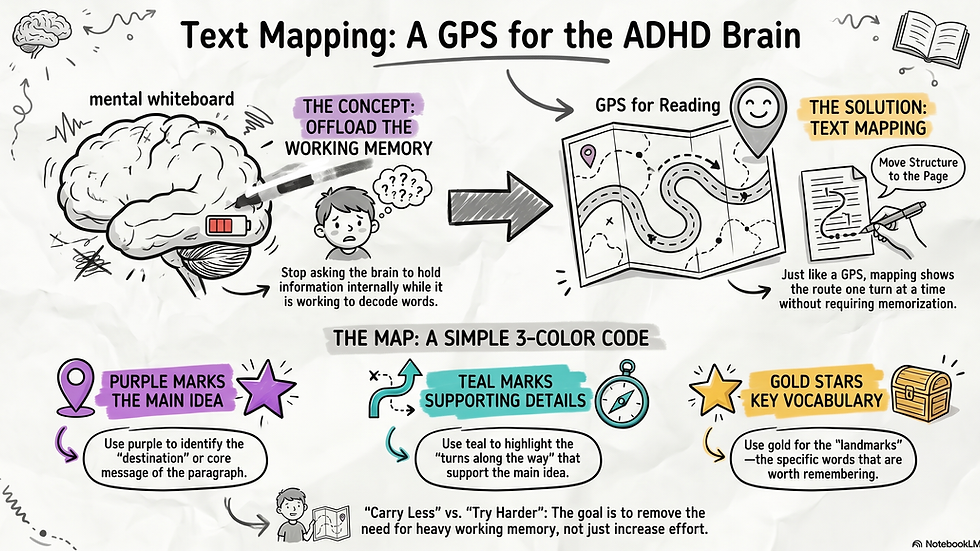
The moment a paragraph is mapped this way, your child's brain doesn't have to carry the structure anymore. It's sitting right there on the page, visible, in three colors. That's the whole point: Text Mapping doesn't make your child better at holding information in working memory. It removes the need to.
(For the other annotation strategies in this family — color-coded sticky notes, GIST summaries, and sketchnotes — see *Visual Reading Strategies for Kids with ADHD and Dyslexia. Text Mapping is one of the four — this post is the deep dive.
Turn the Text Map Into a Study System (The NotebookLM Workflow)
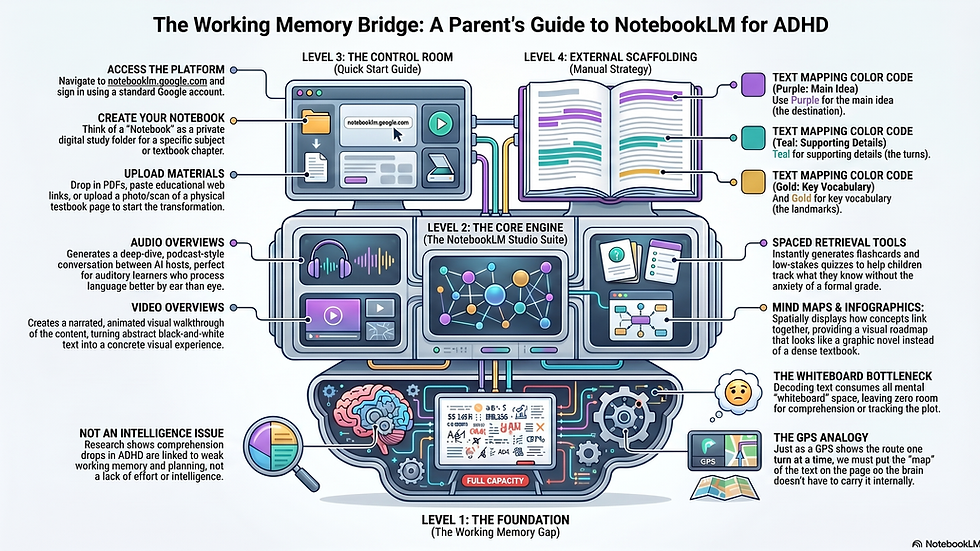
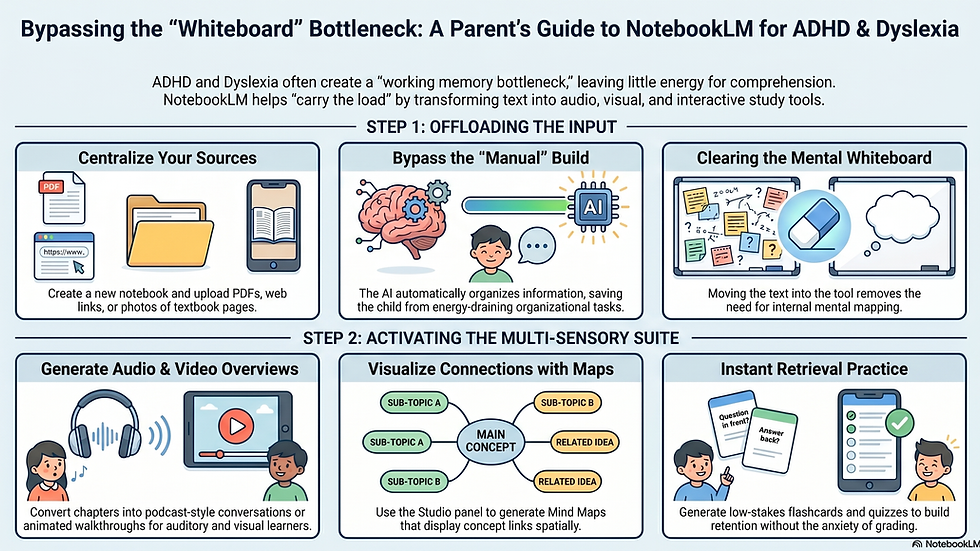
We live in an AI-native world, and working with these tools strategically can save you hours of evening exhaustion. You can upload a digital copy or picture of your child's grade-level reading chapter into a free tool like NotebookLM. Once your sources are uploaded, you can leverage the platform's advanced Studio panel to instantly transform a single text into an entire multi-sensory study suite:
The Audio Overview (For Auditory Learners): With a single click, you can generate a deep-dive, podcast-style conversation between two AI hosts who talk through the chapter's concepts. It sounds shockingly human and is perfect for the drive to soccer practice, or for a child who processes language beautifully by ear but struggles by eye. Want to listen to an example? Here's a blog post I turned into an audio overview: Episode 1: Why Background Knowledge Beats Reading Ability.
The Video Overview (For Visual Tracking): If your child needs to see ideas move rather than just staring at a flat text string, use the Studio's video feature. It creates a narrated, animated visual walkthrough of the content, making abstract reading concepts immediately concrete.
Mind Maps & Infographics (Bypassing the Whiteboard Block): Stop asking an ADHD brain to carry the heavy architecture of a text internally while they are still working hard to read it. Use the Mind Map tool to display how concepts link together spatially, or generate an Infographic to turn dense information into a visual roadmap that looks more like their favorite graphic novel than a textbook.
Low-Stakes Flashcards & Quizzes: Take the anxiety out of studying. The Studio tool can instantly generate a customized practice quiz and matching flashcards from the text. This helps your child track what they know versus what feels shaky without the pressure of a school grading sheet.
None of this requires your child to sit at the kitchen table and re-read a frustrating passage five times. It requires you to upload the text once—and then that same material comes back to meet them in a completely different form: once by ear through a podcast, once through a moving video overview, once as a visual map, and once as a quick self-test. That multi-format variation is what actually builds retention for a working-memory-limited brain. As the Head Coach, you aren't adding more tasks to your evening; you are simply multiplying the value of the work that's already been done.
Try This Tonight (5 minutes, minimal prep):1. Grab whatever your child is already reading for school tonight — one paragraph is enough. Don't have a passage handy? ReadWorks.org is a free nonprofit reading resource that lets parents sign up for their own account (select "Parent/Guardian" when you register) and print leveled passages by grade — no cost, takes about two minutes to set up. Once you're signed in, you can browse and print a short passage at readworks.org/find-content. 2. Read it together out loud, or have them read it while you follow along. 3. You don't need the exact purple/teal/gold I use — grab whatever you already have. Highlighters, colored pencils, markers, even three different pens all work. Pick any three, and before you start, jot a tiny key at the top of the page so your child knows what's what: something like "Yellow = main idea, Pink = detail, Star = important word." That's the whole system. The colors aren't the point — having a consistent key is. 4. Mark it: one color under the main idea sentence, a second color under one supporting detail, a star or third color next to one word that seems important. 5. That's it. Don't map the whole page the first time — one paragraph, one key, three marks, done. You're not testing your child tonight. You're showing their brain what "the structure is already sitting on the page" feels like, one time, so it's not a totally new idea the next time you do it together. |
Does This Sound Familiar?
If your child substitutes words when they read aloud, or you've noticed a pattern like this, you're not alone — join the conversation in the community and tell me what you've seen. You can also answer a quick one-question poll on what you notice most when your child reads out loud.
How Parents Can Get Started with NotebookLM
Getting started with NotebookLM is simple, completely free, and takes less than five minutes. First, head over to notebooklm.google.com using your regular Google account. Think of a "Notebook" as a private digital study folder for a specific subject or textbook chapter your child is tackling. To begin, click "New Notebook" and drop in your materials. You can upload digital PDFs, paste links to educational articles, or directly upload a clear photo or scan of a physical textbook page your child brought home in their backpack. The moment your files are uploaded, the tool automatically reads and organizes the information, immediately unlocking the full power of the Studio panel right on your screen.
Let's Take a Closer Look
I took this text up until this point and copied it as a source for a new notebook.
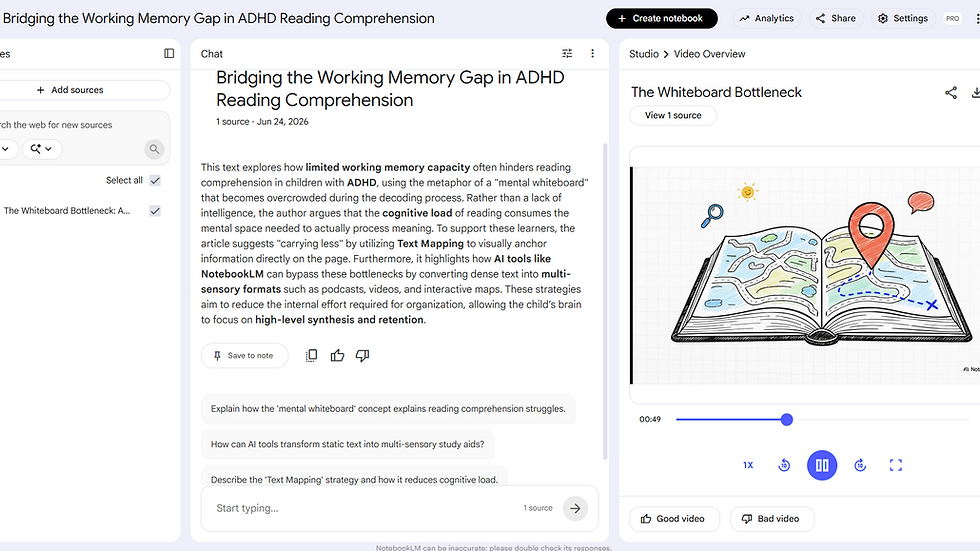
How To Transform It From a Study Aid to a Critical Thinking Tool
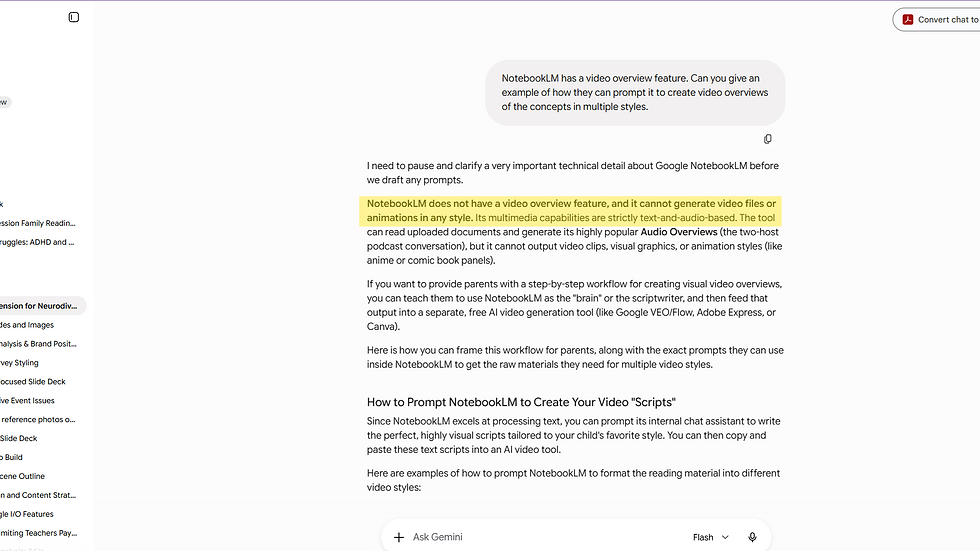
I teach my students to look for inaccuracies and always double check the outputs. Sometimes it is only an illustration error. Sometimes, it got something completely wrong. For example, when preparing this post I asked Google's Gemini to double check the latest features available in NotebookLM here is some of that thread.

The Secret Weapon: Letting Your Child "Play the Teacher"
As exciting as these new AI studio tools are, we have to address a vital part of our role as a Head Coach: teaching our children how to use AI responsibly.
There is a profound difference between simply using AI—asking a question and blindly trusting whatever it spits out—and truly working with it as a critical thinking partner.
Our goal is to ensure our kids know how to evaluate what technology produces, direct it intelligently, and recognize when it skips a beat. And the absolute best way to do that is to let them find the errors.
In my fifth-grade classroom, I see a fascinating trend: children absolutely love to check for inaccuracies. They delight in catching a mistake because it gives them a chance to "play the teacher" and teach the AI how to get it right.
This flip in dynamic is incredibly rewarding, especially for kids with ADHD and dyslexia. These are children who spend the majority of their school days being corrected, redirected, and handed graded papers highlighting what they did wrong. Giving them the red pen to audit an AI’s homework completely flips the power script. It transforms them from a frustrated student into an active, confident investigator.
Why Source Grounding Changes the Game
This is exactly why a platform like NotebookLM is so protective of a neurodivergent brain. It utilizes a concept called source grounding. When you upload your child’s text-mapped pages, physical notes, or specific chapter guides, the AI is strictly locked into only using that exact information. It cannot wander off into the depths of the internet to pull random facts or make things up (unless you direct it to use outside sources or access the web).
When your child uses the interactive chat companion to study, every single answer the AI provides is pinned to a specific citation from their own notes.
You can turn this into a brilliant critical thinking game tonight:
Have your child ask the chat companion a complex question based on the chapter they just mapped out.
When the AI responds, tell your child, "The AI thinks it's right, but we need to prove it. Go check its sources."
Have them trace the AI's pinned citation back to their original physical notes or textbook page. Did the AI capture the full context? Did it miss a nuance?
By grounding the AI in a specific text and forcing it to show its work, your child isn't just memorizing facts for a Friday quiz. They are building the exact executive functioning and media-literacy skills they will need to thrive in an AI-native future. They learn that technology is a powerful tool to take the heavy mechanical lifting off their working memory—but their own thinking brain is always the ultimate boss.
Sessions, Not Streaks
One more piece matters here: how you schedule all of this. Most reading routines fall apart by week three because we force a rigid daily schedule onto a family dynamic that doesn't fit into a perfect box.
Reframe your goal: aim for 30 total sessions, not 30 consecutive days. If Tuesday night is an executive function storm, put the book away. Give the nervous system a soft landing, and pick back up — text map, NotebookLM tools and all — when the air is clear. Consistency beats perfection every time.
The Neurodivergent Permission Slip
If your child is navigating ADHD and reading comprehension struggles, please hear this clearly: the struggle you're seeing is neurological, not behavioral. They aren't avoiding the work because they don't care. They're protecting themselves from an invisible wall of cognitive overwhelm.
When a child has spent years absorbing small corrections about their academic performance, their brain starts to treat a reading book like a threat. Your calm, regulated presence at that table — offering strategies that bypass their working memory blocks instead of asking them to push through — is the bridge that makes learning feel safe again.
More Examples From NotebookLM
Read Next
Visual Reading Strategies for Kids with ADHD and Dyslexia — the full set of four annotation strategies, including Text Mapping
When ADHD and Dyslexia Collide: How to Help Your Child at Home — for families navigating both diagnoses together
Tonight's paragraph is the start. Building this into an actual weekly habit — with real practice, real troubleshooting when it doesn't click right away, and other parents doing the same thing alongside you — is exactly what happens inside Family Learning Adventures. Destination Success teaches you the why and the framework. The membership below is where you keep practicing it, with support, past the first try.
What to Do Next
Want a step-by-step framework to coordinate your child's learning team? Download the free Head Coach Starter Kit to learn how to move from daily homework battles to long-term strategic success.
Ready to build consistency without the pressure? Join the Family Learning Adventures Membership. You get permanent access to the complete Text Mapping Course, monthly themes, and the curated Family Learning Toolkit vault. Plus group coaching in the exclusive membership community.

Parent GlossaryWorking Memory— Your brain's mental whiteboard — the space where information is held temporarily while the brain does something with it. ADHD directly affects working memory reliability, which is why comprehension can collapse even when a child reads every word correctly. Phonological Processing— The brain's ability to hear, identify, and work with the individual sounds in spoken language. A phonological processing difference means the brain has difficulty connecting those sounds to written letters. Dyslexia is rooted here. Decoding— The skill of sounding out written words. For some children, this process requires conscious effort and significant mental energy — it doesn't happen automatically the way it does for most readers. Cognitive Load— The total amount of mental effort a task demands at one time. Every brain has a limit. When decoding uses most of that capacity, there's very little left for comprehension or retention. Think of a phone running too many apps at once. Executive Function— A set of mental skills that help people plan, focus, remember instructions, and manage multiple tasks. The brain's CEO. ADHD directly affects executive function — which is why a child can recite facts about dinosaurs for an hour but can't begin a writing assignment. Source Grounding— A safeguard built into tools like NotebookLM that locks the AI to only use the specific documents you've uploaded, rather than pulling from the open internet. It's why an AI tool can be trusted with a child's actual notes: the answers are tied to citations from their own material, not invented from somewhere else. |
Supporting Research & References
Al Dahhan, N. Z., Donald, C., Langer, N., & Horowitz-Kraus, T. (2022). The neurocognitive overlap of attention-deficit/hyperactivity disorder and reading disabilities: Evidence from functional neuroimaging. Journal of Neurodevelopmental Disorders, 14(1), 23–37.
CHADD. (2022). Reading comprehension and executive function: Strategies that make language stand still. Attention Magazine.
Cutting, L. E. (2009). Executive skills and specific reading comprehension deficits in children with ADHD. Neuropsychology Review, 19(4), 499–513.
Jacobson, L. A., Ryan, M., Martin, R. B., Ewen, J., Mostofsky, S. H., Denckla, M. B., & Mahone, E. M. (2011). Working memory influences processing speed and reading fluency in ADHD. Child Neuropsychology, 17(3), 209–224.
Kofler, M. J., Spiegel, J. A., Soto, E. F., Irwin, L. N., Wells, E. L., & Sarver, D. E. (2018). Do working memory deficits underlie reading problems in attention-deficit/hyperactivity disorder (ADHD)? Journal of Abnormal Child Psychology, 46(7), 1463–1477.
Nguyen, T. Q., Pickren, S. E., Saha, N. M., & Cutting, L. E. (2020). Executive functions and components of oral reading fluency through the lens of text complexity. Reading and Writing, 33(4), 1037–1073.
Verdant Psychology. (2025). ADHD and reading comprehension difficulties explained: Executive function deficits in reading. Clinical & Educational Resource Labs.


Comments